Self-Service Kiosk Ordering System: A Complete Guide for Fast Food & Cafes (2026)
June 12, 2026
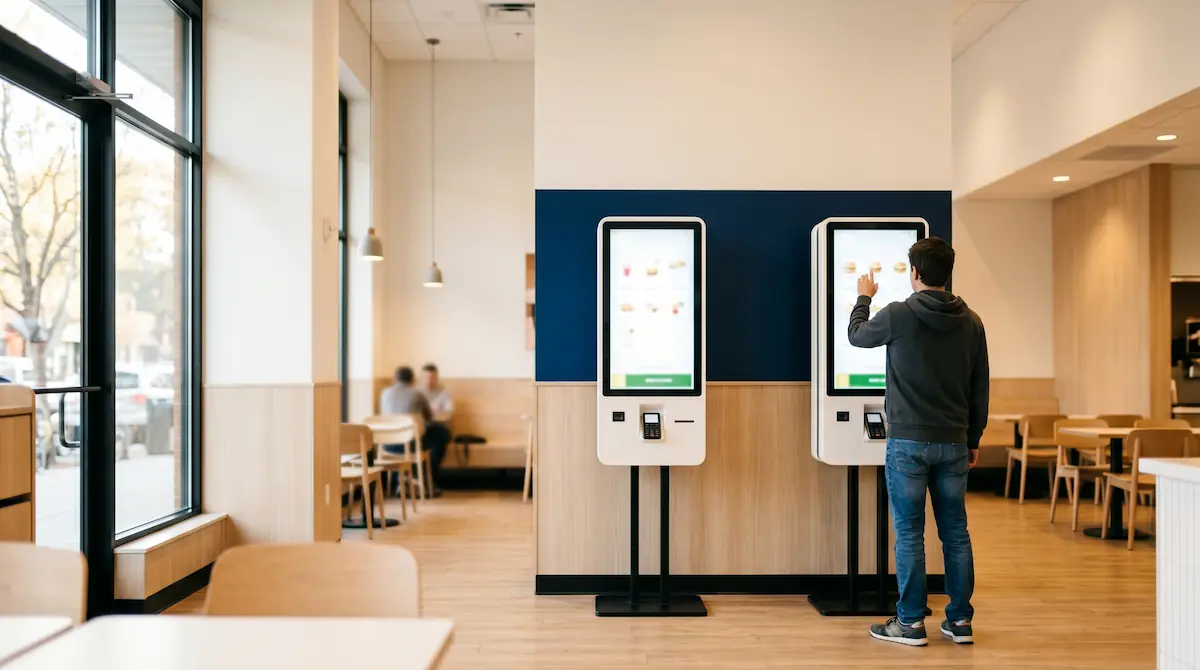
A self-service kiosk is a touchscreen ordering terminal where customers browse the menu, customise their order and pay on their own, without interacting with a cashier. Fast food chains and cafes use kiosks to shorten checkout queues, reduce order errors and lift average order value through visual menus and consistent upsell prompts.
Over the past decade the world's largest quick-service chains — McDonald's, Burger King, KFC, Taco Bell — have made kiosks a default part of every new store, not an experiment. The reason is consistent across markets and operator sizes: kiosks deliver measurable improvements in three numbers that matter most to a quick-service operator: throughput, average ticket and labour productivity. Industry studies from firms such as Mastercard, Deloitte and Tillster repeatedly report 20–30% higher average order values on kiosks versus traditional counter ordering, and operators consistently report shorter queues even with the same staffing.
This guide walks through how a kiosk ordering system works end-to-end, what it actually changes in your operation, what it costs, what you need before installing one, and the mistakes most operators make in their first roll-out.
How a Self-Service Kiosk Ordering System Works
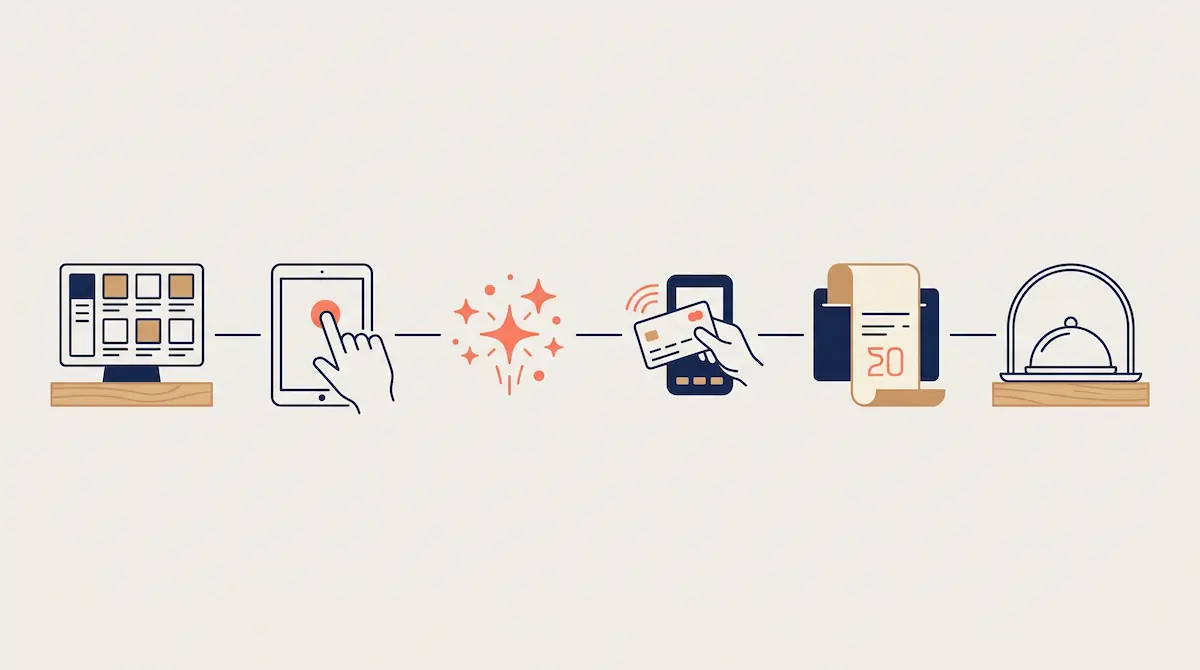
From the customer's side the flow looks effortless. Behind the screen, the kiosk is tightly coupled with the POS system, the kitchen display, payment hardware and inventory. A typical order looks like this:
Browse: The customer scrolls through visual menu categories on a large touchscreen.
Select and customise: They add items, pick sides, drinks, sauces and combo upgrades. The kiosk surfaces upsell and cross-sell suggestions at the moment of decision.
Review: The cart is summarised on a confirmation screen with item-level edits available.
Pay: The customer pays by card, contactless, mobile wallet (Apple Pay, Google Pay) or, in some setups, cash.
Order number: The kiosk prints or displays a unique number. The order is sent simultaneously to the POS and the kitchen display.
Pick up: When the order is ready the number is called on a screen or speaker; the customer collects from the counter.
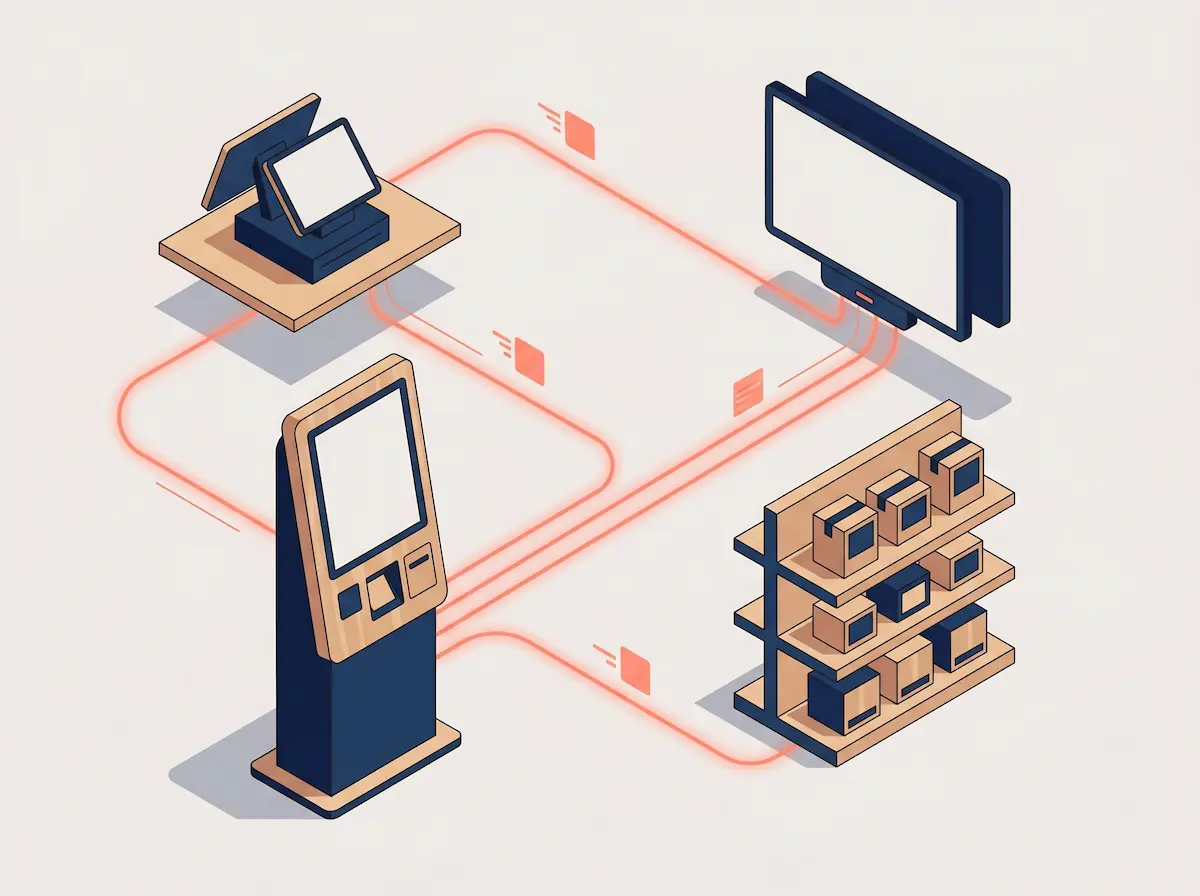
The decisive part of this flow is what the customer never sees. The moment they tap "Pay", the order updates the POS, the kitchen display, inventory and daily reports at the same time. There is no second data entry, no reconciliation between cashier and kiosk, no manual stock adjustment.
What a Kiosk Actually Changes in Your Operation
The appeal of kiosks is not "modern looks". It is four measurable operational effects.
1. Queues Get Shorter — Often Dramatically
A single counter cashier becomes the bottleneck at peak. Three or four kiosks placed side by side let three or four customers order in parallel. The cashier's questions, item entry, payment processing and change-making — all of it — happen at the customer's own pace, in parallel, without anyone waiting for anyone.
Field studies in quick-service restaurants typically show that adding a kiosk array roughly doubles peak-hour ordering capacity with the same staff. Shorter queues also recover customers you currently lose: those who glance through the window, see a long line and keep walking.
2. Average Order Value Rises 20–30%
This is the most-discussed kiosk effect and it shows up consistently across operators. Two reinforcing reasons:
Visual menu effect: Photographs and ingredient close-ups are far more appetising than a backlit menu board. Customers see what they could add and add it.
Removal of the social barrier: At a counter, asking the cashier to "upsize my fries and add a dessert" feels mildly performative. The kiosk never judges; customers feel free to indulge.
Consistent prompting: A tired cashier sometimes forgets to ask "make it a meal?". A kiosk never forgets. The right suggestion appears at the right moment, every time.
Reports from Mastercard, Tillster, Deloitte and operator case studies converge on a 20–30% average order value lift on kiosk orders versus counter orders, and the lift is even higher on highly customisable items like burgers and pizzas.
3. Labour Cost Becomes More Flexible
Kiosks do not eliminate staff; they reposition them. The typical transition pattern:
A store that ran two cashiers at peak moves to three kiosks plus one cashier.
The second cashier becomes a "kiosk host" or floor lead — greeting customers, helping first-time users, clearing tables and running orders to guests.
Customer perception improves because staff are visible in the room, not stuck behind a counter.
Crucially, the marginal cost of opening a third or fourth kiosk at peak is far below the cost of hiring an additional part-time cashier. Capacity scales without payroll scaling at the same rate.
4. Order Accuracy Improves
"I said no onions", "I wanted a large", "this isn't what I ordered" — most of these are verbal-handoff errors at the counter. With a kiosk, the customer makes and confirms each choice themselves on screen. Errors drop sharply, refunds and remakes drop with them, and food cost improves as a side effect.
Which Businesses Should Invest in Kiosks?
Kiosks are not the right answer for every operator. The decision becomes clear with a few honest checks.
Strong fit:
QSR / fast food: Burger, pizza, fried chicken, sandwich and similar formats with a standard menu plus customisations. This is the kiosk's natural home.
Fast casual cafes and coffee shops: Coffee, pastries, snacks with high throughput at peak. Several global coffee chains have made kiosks a default in flagship stores.
Food courts, stadiums, airports, transit hubs: Locations where queues are the dominant constraint and customers are conditioned to self-serve.
Bakeries, ice cream shops, dessert counters: Highly visual menus, perfect for screen-based ordering.
Moderate fit:
Convenience stores and grab-and-go: Self-checkout (a different category) is usually a better fit than ordering kiosks, but in cafe-style outlets the line blurs.
Hotels, highway restaurants, mixed-traffic locations: Diverse guest profiles call for a hybrid model — kiosks plus a staffed counter.
Weak fit:
Full-service, table-service restaurants: The customer journey is built around being served. A QR menu is almost always the right digital tool here, not a kiosk.
Highly bespoke menus: Where every order is a conversation, kiosk flows become slow and frustrating.
Customer base with low tech affinity: Without a friendly host to help on first use, kiosks underperform. The investment needs to include staff training.
What Does a Kiosk Cost and When Does It Pay Back?
The total cost of a kiosk roll-out usually breaks down into four buckets:
Hardware: A 21–32 inch touchscreen, enclosure or stand, receipt printer and integrated payment terminal. Per-unit hardware costs vary widely by region and vendor, but a freestanding kiosk typically sits in a band that is comparable to one to two months of a part-time cashier's loaded cost.
Software / subscription: Kiosk software is normally licensed as a monthly subscription, often bundled into the POS plan rather than priced separately.
Setup and integration: Menu design and photography, payment terminal pairing, kitchen display sync, initial staff training. A one-off cost.
Ongoing: Power, internet, software updates, occasional screen or printer maintenance.
A simple payback example, useful as a thinking tool rather than a precise number:
Daily customers: 250
Average ticket today: $10
Current daily revenue: $2,500
20% kiosk lift on ticket: +$2 × 250 = +$500/day in additional revenue
Monthly additional revenue: ~$15,000
At 25% gross margin, monthly additional gross profit: ~$3,750
Single kiosk hardware + setup: roughly $4,000–6,000 depending on configuration
Under this scenario a single kiosk pays for itself in roughly 1–2 months. Lower-traffic stores see longer paybacks — typically 6–12 months — but the ticket lift is observed almost everywhere.
Kiosk Setup Requirements (Checklist)
Before installation, the following should be in place:
Physical space: A location that does not block traffic flow, with a nearby power outlet. Decide between freestanding floor units, countertop units, or wall-mounted enclosures.
Power and connectivity: A stable power source and, ideally, wired Ethernet rather than Wi-Fi. Order traffic should not depend on a coffee-shop Wi-Fi signal.
Payment hardware: A payment terminal that supports contactless, mobile wallets and the local card schemes you accept. Make sure mobile wallets (Apple Pay, Google Pay) are enabled by default.
Receipt printer: For the order number ticket. Integrated into the kiosk or sitting beside it.
Menu content: High-resolution product photography, accurate item names, complete modifier lists, allergen information. Poor photography is the single biggest reason kiosk investments underperform.
POS system: A POS that natively integrates with the kiosk — sharing menu, stock and reporting. Without this, the kiosk becomes an isolated island.
Kitchen display (KDS) or printer: The kitchen must see what the kiosk sells without cashier intervention.
Staff training: Train one or more team members as kiosk hosts to greet, help and recover edge cases.
Why POS Integration Is Non-Negotiable
Many operators evaluate kiosks as a standalone device. They almost never deliver their potential that way. Three things only work when the kiosk is a native extension of the POS:
Single source of truth for the menu. If menu and prices live in two systems, every change has to be made twice. Sooner or later one is forgotten, and the kiosk shows a different price from the counter. With an integrated system the menu is edited in one place and propagates everywhere.
Single source of truth for inventory. A kiosk sale must decrement the same stock unit that a counter sale decrements. Otherwise the kiosk happily sells items the kitchen no longer has, and you end up issuing refunds and apologies. An integrated POS prevents this by design.
Single source of truth for reporting. End-of-day reports — sales, payment reconciliation, tax — must combine kiosk and counter into one consistent view. Without that, every shift end becomes a manual reconciliation exercise.
Modern POS platforms designed around omnichannel ordering treat kiosks, QR menus and traditional counter terminals as different surfaces over the same backbone. This is the model that scales.
Common Mistakes in a Kiosk Roll-Out
Using low-quality product photography. The kiosk is a visual medium. Pixelated, badly lit photos erase the ticket lift you are paying for.
Copying the counter menu structure 1:1. Kiosk menus need a redesigned hierarchy. If the most ordered item is not reachable in three taps, the flow breaks down.
Skipping the kiosk host role. In the first weeks, many customers will be using a kiosk for the first time. Without a friendly staff member nearby, they default back to the counter and the investment underperforms.
Limiting payment options. No mobile wallets, no contactless, awkward gift card flows — every limitation drops completion rates.
Buying a kiosk that does not integrate with the POS. Cheaper upfront, more expensive within a year due to inventory, pricing and reporting mismatches.
Forgetting accessibility. Screen height for wheelchair users, contrast for low-vision customers, audio guidance for visually impaired guests. A kiosk should serve every guest, not most of them.
Frequently Asked Questions
Do kiosks eliminate staff?
No. They reposition staff. Cashier hours move to floor hosting, kitchen support and order running. Many operators serve more customers with the same headcount instead of cutting staff.
What about older or less tech-savvy customers?
A hybrid model is always the answer: at least one staffed counter remains open and a kiosk host is available to help. In practice, most first-time users become independent on their second visit.
Can a kiosk run without a POS?
Some kiosk software runs standalone. In practice that means manual menu, stock and reporting maintenance, which does not scale beyond a single small location. Operating with an integrated POS is the standard for any serious deployment.
Which payment methods should a kiosk accept?
At minimum: chip cards, contactless, mobile wallets (Apple Pay, Google Pay). Region-specific schemes such as meal vouchers or local mobile payment apps should be supported where relevant. Cash modules are optional and many chains operate cashless kiosks.
How many kiosks does one location need?
The rule of thumb is to size capacity for peak: 5–7 minutes per order at the busiest hour. A location doing 60–80 customers per peak hour typically needs 2–3 kiosks. Above 500 customers per day, plan for four or more.
Conclusion
A self-service kiosk, in the right venue and properly integrated with the POS, shortens queues, lowers labour pressure and lifts average order value in a measurable way. For fast food and fast casual cafes it has stopped being a premium upgrade and become the operational baseline competitors are already running.
Two questions decide whether a kiosk is right for your business. Is your menu visual and reasonably customisable? And does your POS system treat the kiosk as a native part of the platform — sharing menu, stock and reporting? If both answers are yes, the payback is typically fast. If either answer is no, fix that first; the kiosk investment will follow naturally.